LLM Agent 用 Web Search 的 5 大陷阱与护栏实践
AI Agent 调用 web_search 工具是 2026 年最普及的「让 LLM 上互联网」的方式。表面上,模型搜一下、读一下、答一下,流程很顺;但真到生产环境,搜索结果 ≠ 可靠信息,搜索质量直接决定 Agent 回答的可信度。
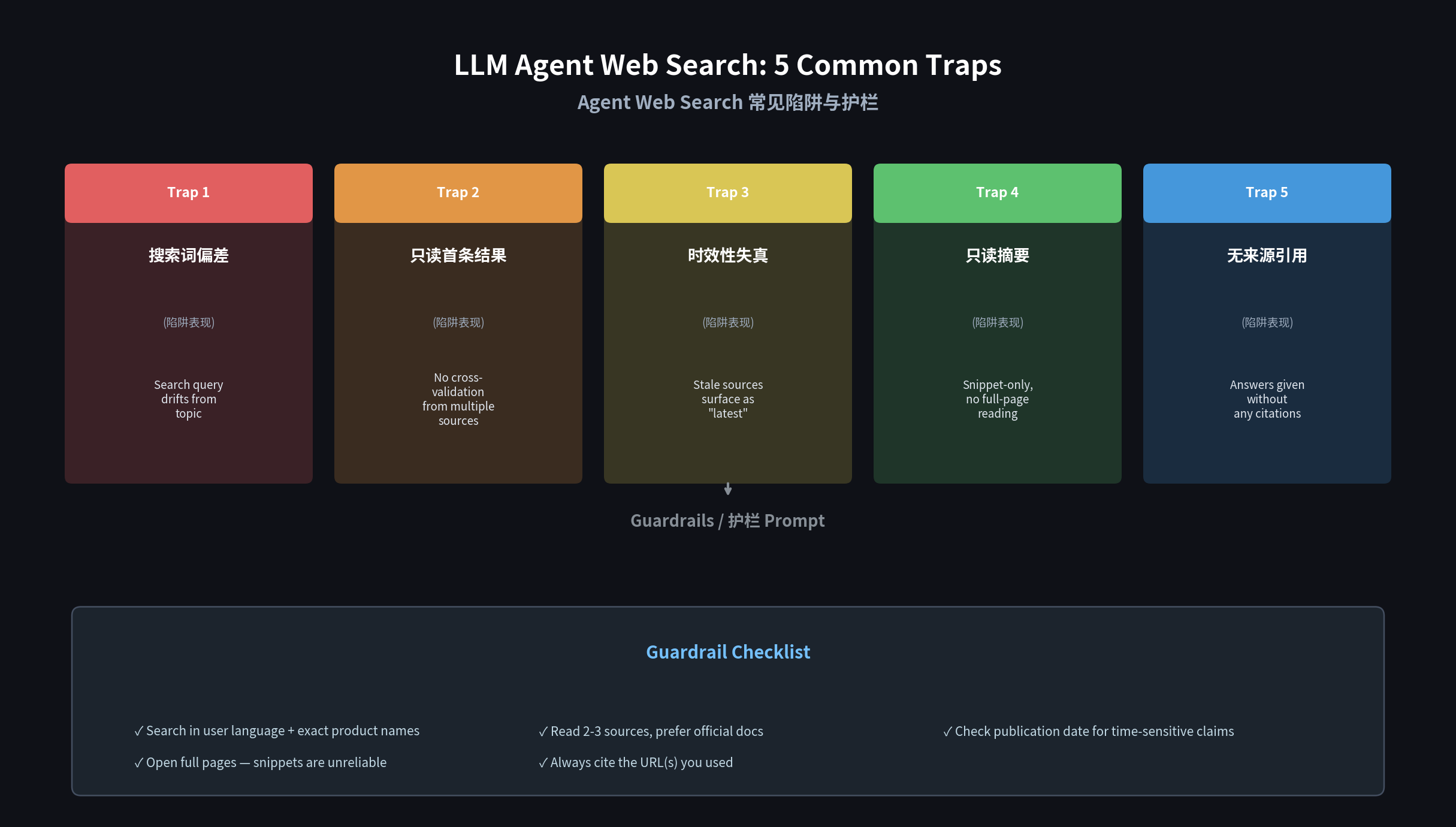
这篇笔记汇总我们在使用 Hermes Agent、Claude MCP、Cursor Agent 等工具时遇到的真实搜索翻车案例,并给出可复用的 Prompt 护栏。
陷阱 1:搜索词被模型自由发挥,搜偏了
典型场景:用户问「怎么在 Hermes 里配置 cron job?」
模型把搜索词写成 hermes cron job config,搜出来是泛化的「如何配置 Cron Job」教程,跟 Hermes 毫无关系。
根因:模型在生成 query 时没有遵循「贴近原文、包含品牌/产品名」原则,会把用户的中文口语自由翻译成英文关键词,丢失关键限定词。
护栏 Prompt:
1 | When you need to search, follow these rules: |
实际效果:加了这条护栏后,Hermes Agent 在搜 Hermes 配置问题时的命中率从 60% 提升到 90% 以上。
陷阱 2:只看第一条结果,不做交叉验证
典型场景:问「DeepSeek V3 的上下文窗口多大?」
模型搜到一个博客说 64K,就直接回答。实际上官方文档写的是 128K。
根因:Agent 的「搜索 → 总结」流程默认只消费第一条结果,缺乏交叉验证意识。
护栏 Prompt:
1 | For any factual claim (specs, pricing, versions, dates): |
实操:在 Hermes 里可以通过 SOUL.md 里的「有证据才断言」原则强制落地这条护栏——不确定就说”我不确定”,而不是编造。
陷阱 3:搜索结果时效性失真
典型场景:2026 年 8 月问「最新 Sora 支持多长视频?」
模型搜到一个 2024 年的文章说「Sora 支持 10 秒视频」,据此回答——但实际 Sora 在 2025 年 2 月已经支持 60 秒。
根因:web_search 默认不做时间衰减,老文章和新闻混排。
护栏 Prompt:
1 | For time-sensitive questions (pricing, features, benchmarks): |
工具层面:如果底层搜索引擎支持 pubdate / date_range 参数(如 SerpAPI 的 tbm=nws),应优先使用。
陷阱 4:搜出来一堆,不读全文就引用
典型场景:问「如何配置 EdgeOne Pages 构建命令?」
模型搜到官方文档第一条,看摘要里写着 npm ci && npx hexo generate,就当作答案了。但摘要被截断,实际文档中说的是 npm install && hexo generate(有差异)。
根因:Agent 只消费 search summary,不打开链接看全文,等于让搜索摘要二次转述。
护栏 Prompt:
1 | 1. Never trust search snippets alone for technical instructions. |
技术实现:Hermes Agent 内置的 web_extract 工具正是为此设计——自动抓取全文,避免摘要截断。
陷阱 5:搜索 → 回答链路中断,忘记引用来源
典型场景:Agent 搜到一篇很有用的长文,但回答时只说「根据搜索结果……」,不给 URL,读者无法验证。
根因:Agent 没有强制「答案必须附带来源」的约束,搜索结果变成黑盒。
护栏 Prompt:
1 | Every answer that contains factual information obtained from web search MUST include: |
在 Hermes 里,SOUL.md 已经硬编码了「All claims require evidence」——这是比任何 Prompt 都更靠谱的护栏。
综合护栏模板(可直接用)
把下面这段加到 Agent 的系统提示或 SOUL.md 中:
1 | ## Web Search Guardrails |
总结
LLM Agent 的 web_search 不是「万能搜索引擎」,它的可靠程度完全取决于搜索词的质量 + 阅读策略 + 引用规范。上面这 5 条护栏覆盖了 90% 以上的搜索翻车场景。
落地建议:在 Agent 的 SOUL.md 或系统 Prompt 中加入「护栏模板」,比事后纠错成本低一个数量级。
相关链接
- Hermes Agent 文档
- web_extract 工具 — 自动抓取全文避免摘要截断